 LF Tool Officially Released!
Today, we bring you a comprehensive management tool specifically designed for Android car machines - LF Tool!
When using the car machine daily, have you encountered problems such as inconvenient file management, cumbersome application installation, difficult-to-find system settings, and troublesome file transfer between your phone and the car machine?
LF Tool was developed to solve these everyday needs.
The software integrates file management, application management, ADB debugging, wireless file transfer, system settings, application center, and various practical tools, concentrating common functions in one application to make car machine management simpler and more efficient.
The interface is optimized for horizontal screen devices, adopting a unified functional layout, making operations intuitive and convenient for daily use.
 I. Core Function Introduction
 1. File Management
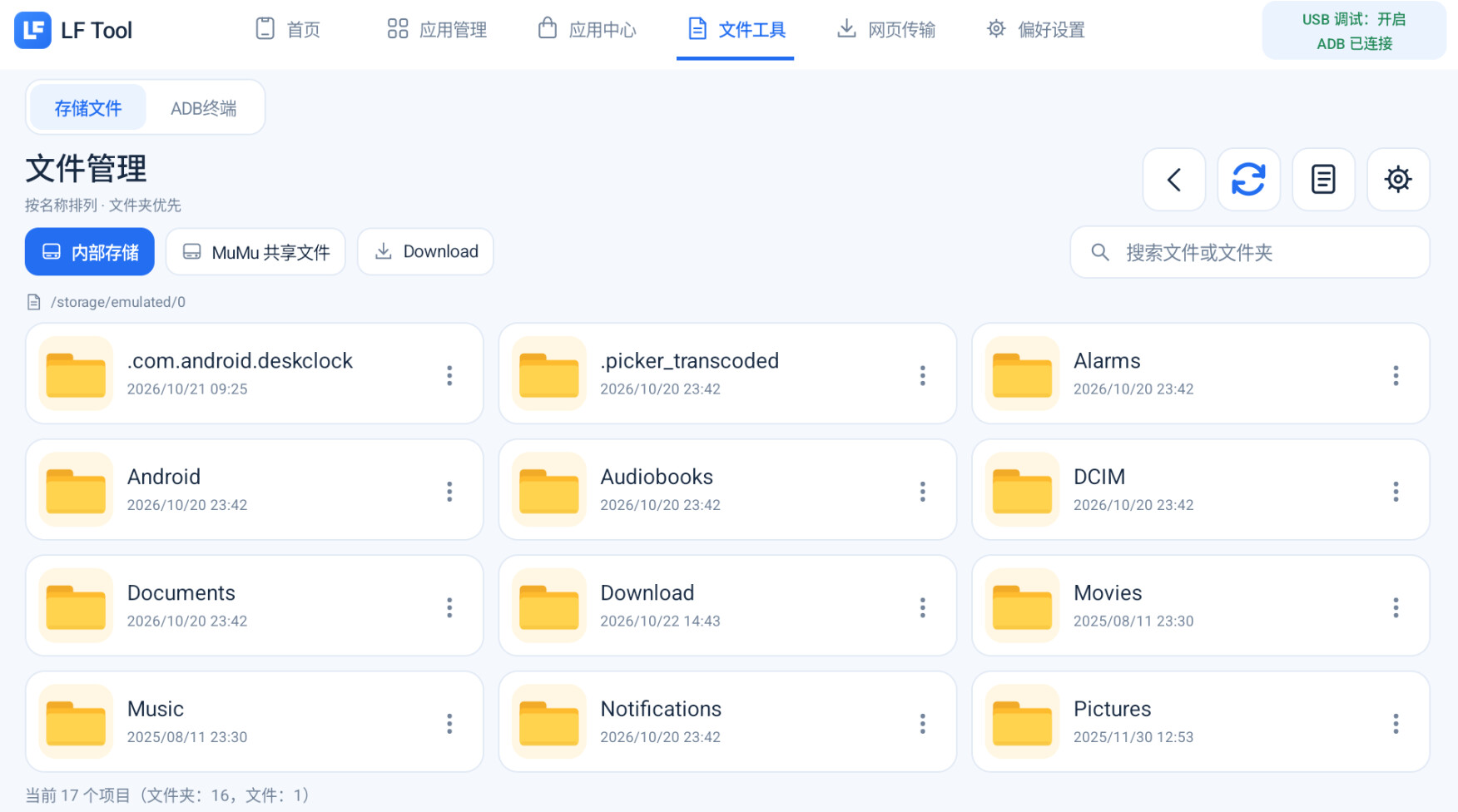
Built-in file manager, no need to frequently switch to other applications to manage various files in the car machine.
-
Browse internal storage space and file directories
-
Support file copying, moving, renaming, and deletion
-
Support recognition and access to external storage devices
-
Quick access to the Download download directory
-
Convenient management of APK installation packages and other files
-
Integrated ADB Shell interaction tool
 2. Application Management
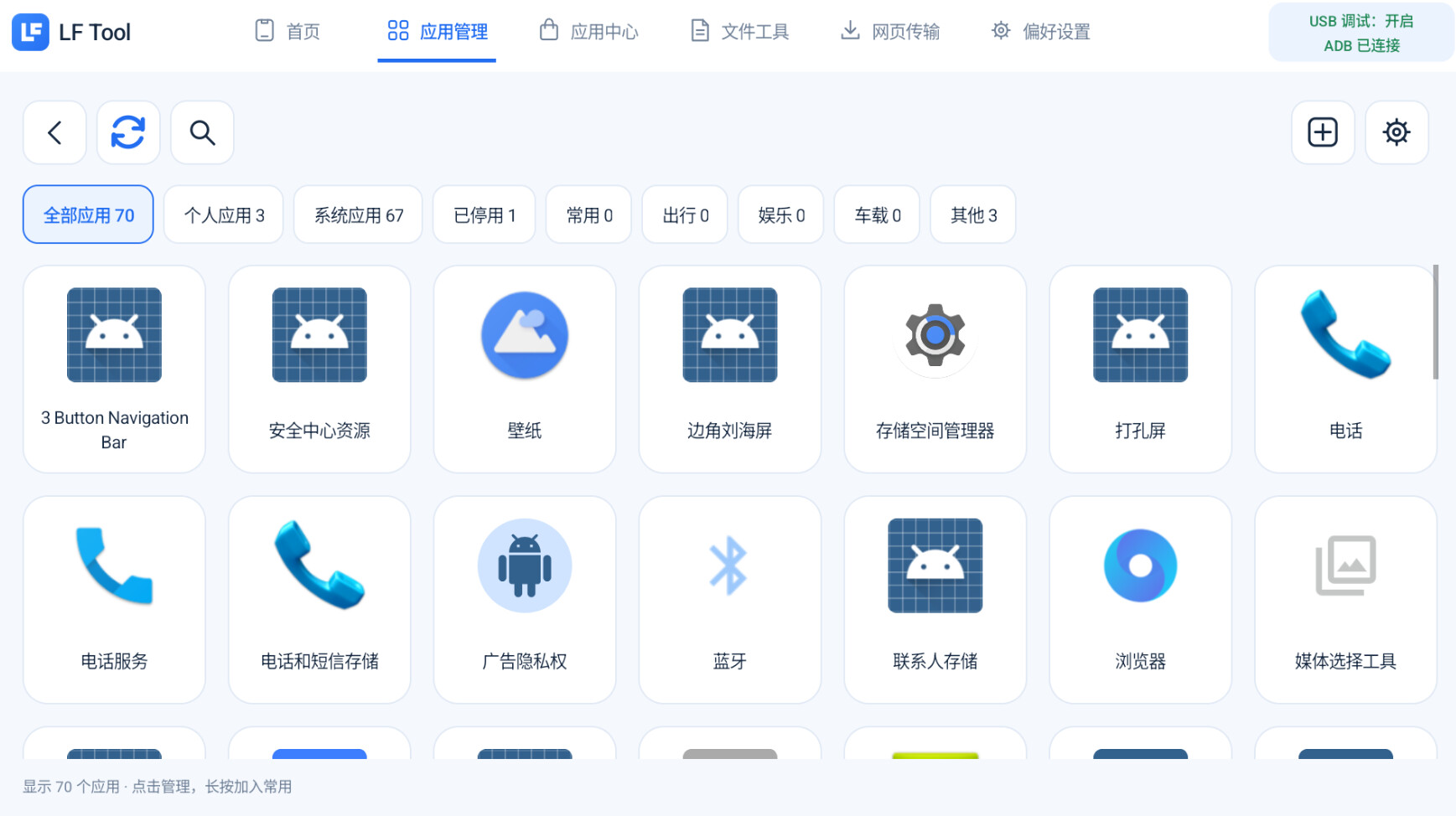
Concentrate on managing installed applications in the car machine for convenient daily maintenance.
-
View installed user applications
-
View system applications and related information
-
Local APK installation
-
Application uninstallation and management
-
Extract installed application APK
-
Quick access to application permission settings
-
Some system application management functions may be limited by system permissions.
 3. Wireless File Transfer
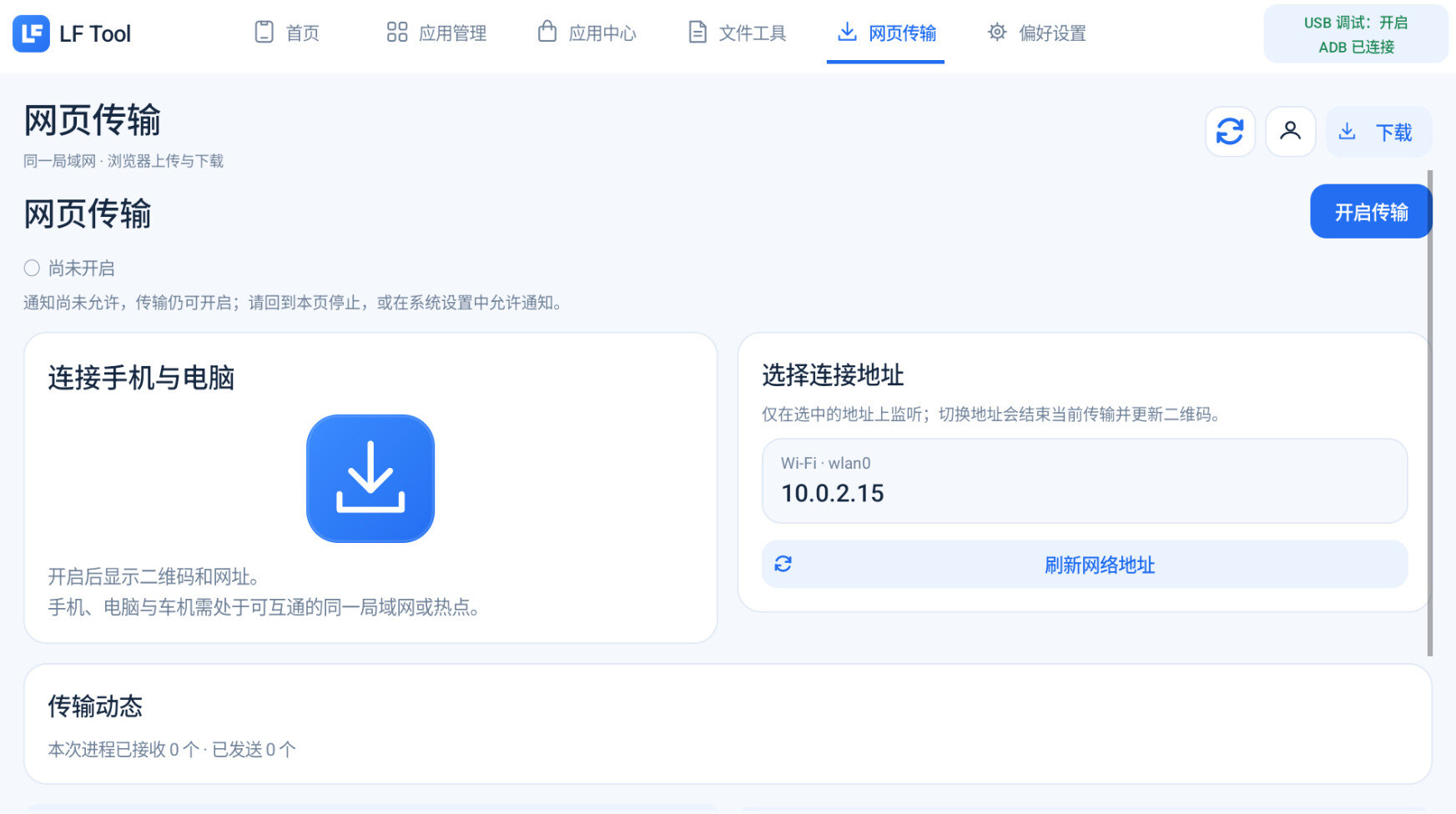
No need for a data cable, transfer files between your phone, computer, and car machine via the local network.
-
Access via browser on your phone or computer
-
No need to install additional transfer clients
-
Support APK, image, and other file transfers
-
Received files are saved to the Download download directory by default
-
Convenient for daily software installation and file transfer
 4. ADB and Developer Tools
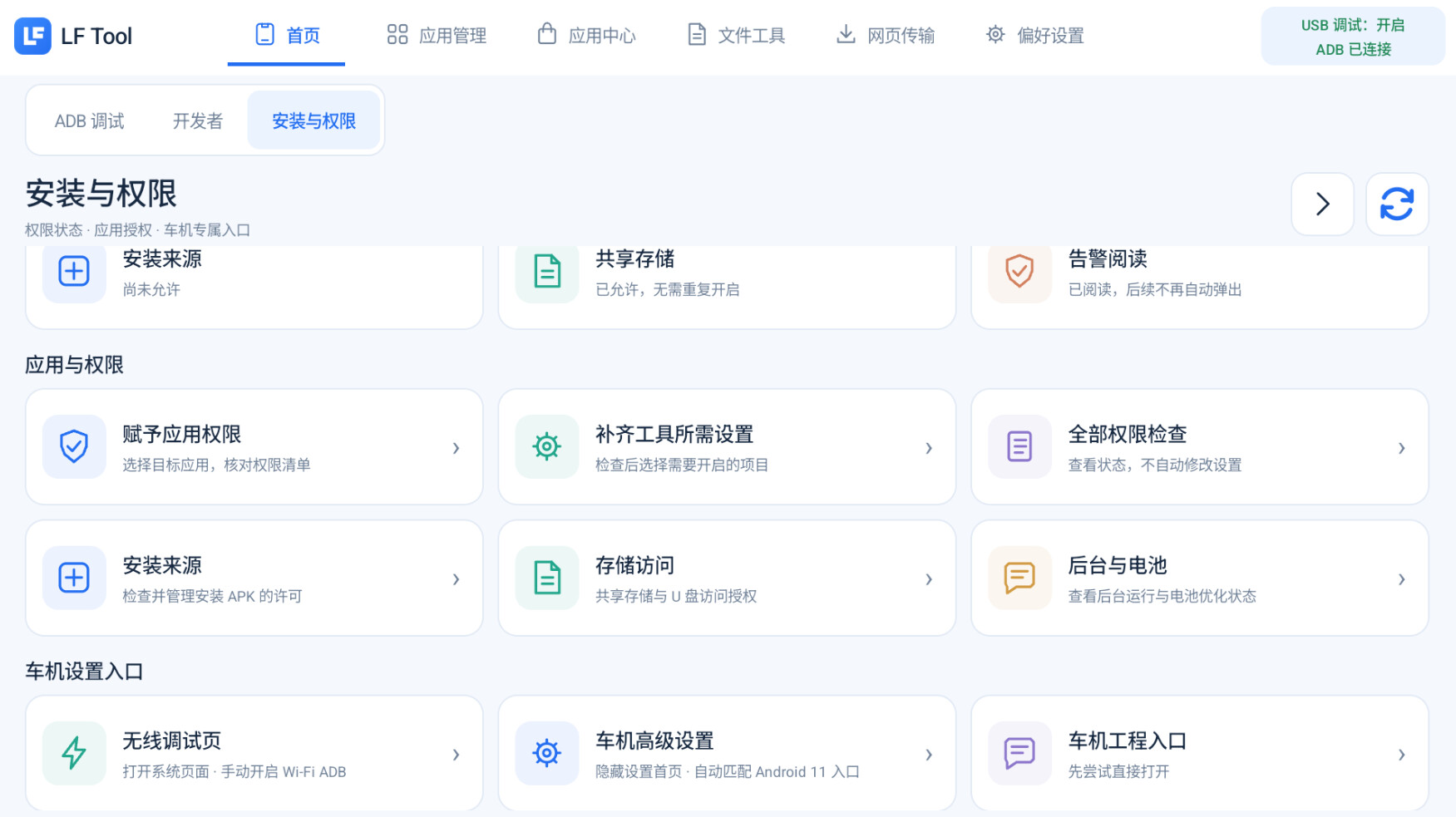
Integrate common debugging functions for quick access to system-related settings.
-
ADB-related function management
-
Developer option shortcut entry
-
USB debugging status display
-
ADB connection status display
-
Car machine engineering entry
-
Built-in ADB Shell
-
Common system permission management
-
Advanced debugging functions require corresponding system permissions; actual support depends on the device.
 5. Practical Tools
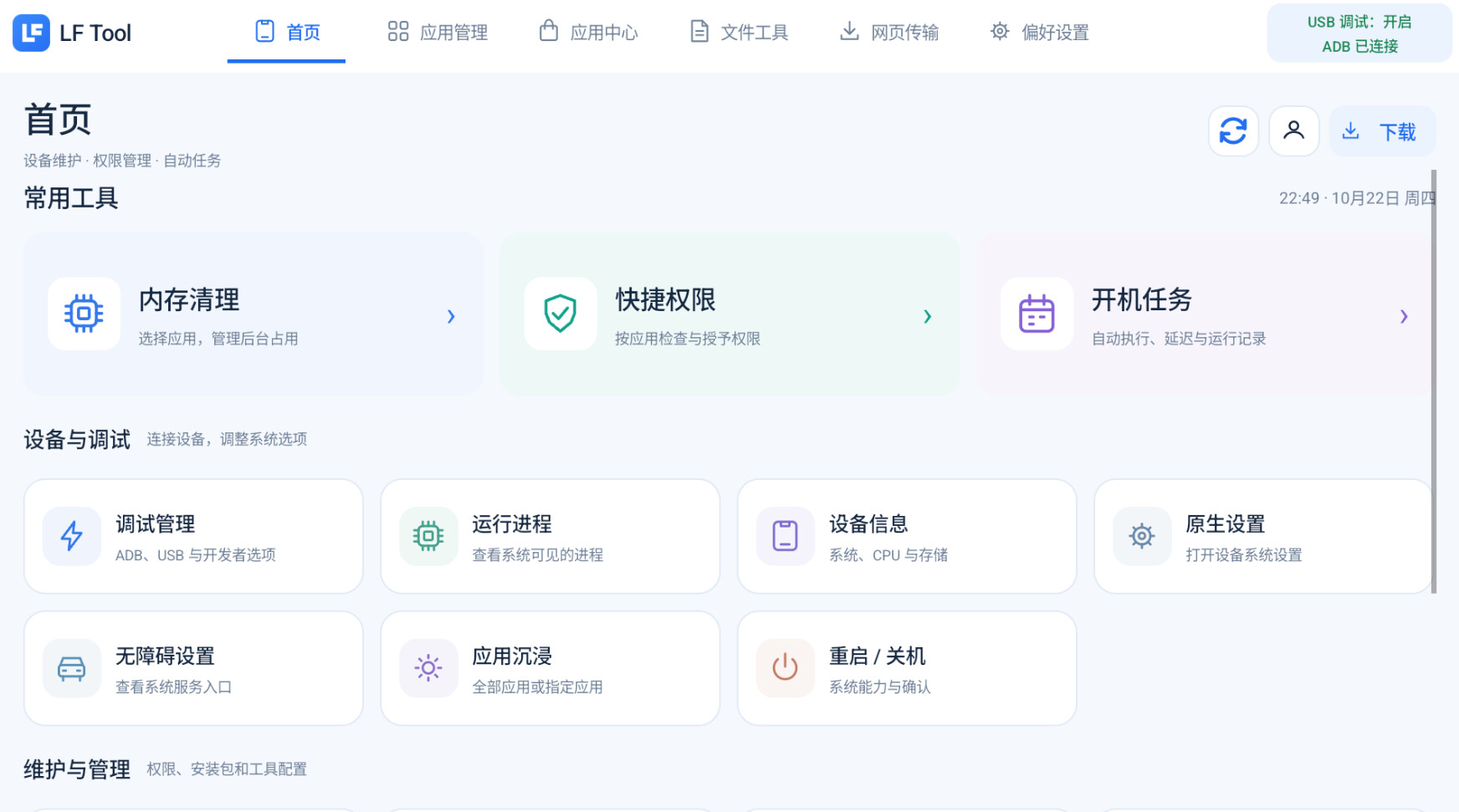
In addition to file and application management, LF Tool provides various auxiliary functions.
-
Memory Cleanup: Provides common memory cleanup operations
-
Boot Task: Manage related boot startup tasks
-
Application Immersion: Provides application immersion mode settings
-
Quick Permission: Quick access to common permission management functions
-
Application Center: Built-in online application resource entry
More functions will be continuously optimized based on user feedback.
 II. Software Features
 Simple and Unified Interface
Adopt a unified page layout and functional classification to reduce complex operations and make each function easier to find.
 Car Machine Horizontal Screen Adaptation
Optimize the interface for horizontal screen devices, considering display effects and touch experiences under different resolutions.
 Multi-Functional Integration
Integrate file management, application management, wireless transmission, system tools, and other common functions into one application.
 Convenient System Tools
Concentrate common system settings and debugging entries for management, reducing repetitive searches and operations.
 Continuous Update and Optimization
Based on actual testing and user feedback, continuously fix issues, optimize compatibility, and perfect functions.
 III. Software Download
Software Name: LF Tool
Current Version: v1.0.4
Software Type: Android Car Machine Comprehensive Toolbox
Applicable Devices: Compatible Android car machines and other Android devices
Release Platform: LeapFans Forum
 LF Tool v1.0.4 Download Address
 Click to Download LF Tool v1.0.4 APK
Warm Tip: It is recommended to obtain the installation package through the download address provided in this post to avoid installing versions from unknown sources or modified versions.
 IV. Installation and Usage Instructions
-
Download the LF Tool APK installation package.
-
Transfer the installation package to the car machine or other Android device.
-
Complete the installation using the device’s built-in installation function.
-
The first time you open the software, grant related permissions according to your actual needs.
-
Enter the home page and select the corresponding function to use.
Usage Precautions:
-
Some functions require additional system permissions or ADB debugging support.
-
Different hardware platforms and system versions may have compatibility differences.
-
Please do not randomly delete system core applications or modify important files.
-
It is recommended to back up important data before operating advanced functions.
-
All debugging and management operations should be performed after the vehicle is safely parked.
 V. Disclaimer
Please carefully read the following content before downloading, installing, and using LF Tool.
1. Software Nature
LF Tool is a third-party independently developed tool software, only for personal learning, technical research, device management, and communication use.
This software does not belong to any device manufacturer’s official product and does not have an official authorization, cooperation, or affiliation relationship with related device manufacturers.
2. Usage Risks
This software includes file management, application management, ADB debugging, system settings, and permission management functions.
Some operations may cause application exceptions, data loss, system instability, device function abnormalities, etc. Users should use it cautiously after fully understanding the related operations and risks.
3. System Security
Please do not randomly delete, disable, or modify system core applications and important files.
It is strictly forbidden to use this software to interfere with, modify, or close any functions related to vehicle driving safety, auxiliary driving, and key control systems.
4. Compatibility Statement
Due to differences in hardware configuration, Android system version, and permission limitations of different devices, this software cannot guarantee that all functions can run normally on all devices.
5. Liability Statement
This software is provided as is, without guarantee of stability, compatibility, or specific purposes.
For device exceptions, data loss, or other consequences caused by using this software, the responsibility should be determined according to the actual situation and applicable laws. Within the scope permitted by law, the developer does not assume responsibility for losses caused by improper use, but does not exclude liabilities that cannot be exempted by law.
6. Usage Agreement
Users should abide by relevant laws and regulations and device usage specifications, and must not use this software for illegal or irregular purposes.
Downloading, installing, or using this software indicates that the user has acknowledged the above risk prompts, but does not affect their lawful rights.
7. Driving Safety
Please do not operate this software during driving.
When performing file management, application installation, ADB debugging, system settings, etc., ensure the vehicle is in a safe parking state.
Important Notice: When performing system-level operations, please ensure you understand the operation content, back up important data in advance, and avoid misoperations that may affect the normal operation of your device.
 VI. Problem Feedback and Suggestions
The LF Tool is still being continuously optimized and improved. We welcome you to download and experience it!
If you encounter any of the following issues during use, please feel free to feedback in the comment area:
-
Software crashes, fails to start, or installation fails
-
Some functions cannot be used normally
-
System applications cannot be read
-
Page display anomalies or resolution adaptation issues
-
Other compatibility issues
-
Functions you hope to add or improve
To facilitate problem location, we suggest providing the following information when feedback:
Device Model:
Hardware Platform:
Android Version:
LF Tool Version:
Problem Description:
Related Screenshots:
We will continue to improve the software functions and user experience based on actual user feedback.
 Final Words
The initial intention of developing the LF Tool is simple: to make Leapmotor infotainment system management more convenient and to integrate commonly used tools.
From file management and application installation to wireless transmission and system debugging, we hope to solve various small problems encountered in daily use through a concise toolbox.
The software still has many areas that can be further improved, and we welcome your suggestions to make the LF Tool better!
If you find the software practical, please like, collect, comment, and share. Your support is the driving force for continuous updates!
Subsequent version updates and related explanations will continue to be published on the LeapFans forum.
LF Tool — Making Leapmotor infotainment system management easier.
© 2026 LeapFans · LF Tool
This software is a third-party independent development tool. Please read the disclaimer carefully before use.